In the realm of Ohio real estate, transparency is the cornerstone of trust. Whether you are a prospective homebuyer, a real estate attorney, or a curious neighbor, the ability to perform a Montgomery County Ohio Property Owner Lookup is a vital skill. This process is governed by the Montgomery County Auditor, whose primary responsibility is to maintain accurate, up to date public records for every parcel within the county. As a specialist in property data systems, I have worked with thousands of public record databases. The Montgomery County Auditor’s portal is one of the most robust in the state, offering a wealth of information if you know where to look. This guide provides the official, step by step methodology for identifying property ownership and understanding the underlying data.
Why Perform a Property Owner Lookup?
Identifying the owner of record is the first step in numerous legal and financial procedures. In Montgomery County, these public records serve several critical functions.
- Legal Verification. Confirming ownership before signing a lease or purchase agreement.
- Property Tax Appeals. Identifying comparable properties (comps) owned by others to argue for a valuation change.
- Neighborhood Analysis. Understanding the distribution of owner occupied versus rental properties in a specific Dayton suburb.
How to Conduct an Official Owner Lookup (Step by Step)
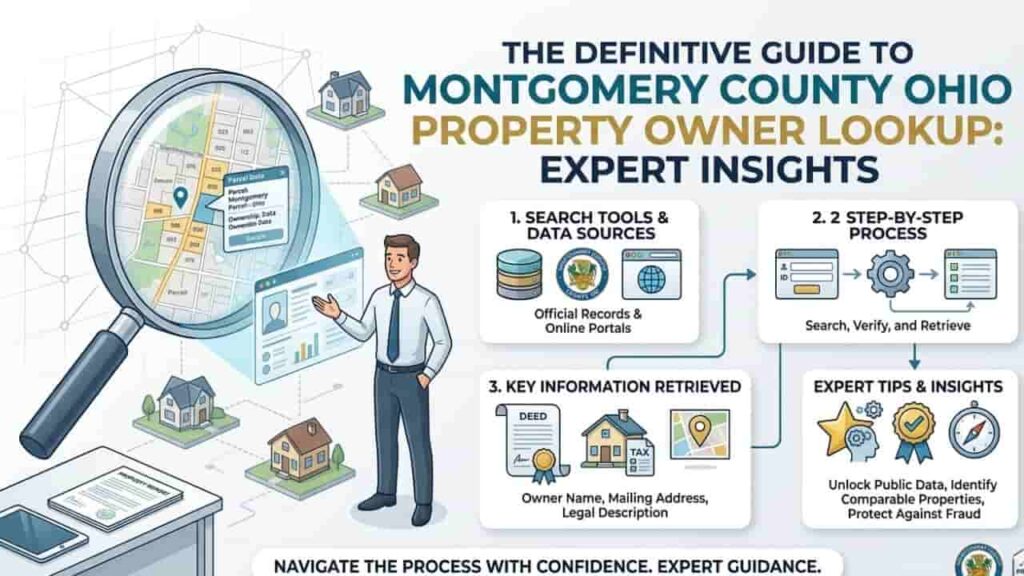
The Montgomery County Auditor provides a centralized portal, mcrealestate.org, which is the “Gold Standard” for local data. Follow these steps to ensure you are viewing authentic information.
Step 1. Go to the Search Portal
Access the official Montgomery County Real Estate search page. Avoid third party “People Finder” sites. They often pull stale data and may charge fees for information that the Auditor provides for free.
Step 2. Enter the Search Criteria
The portal allows you to search by several parameters. To find an owner specifically, you have three primary paths.
- By Name.
Enter the owner’s last name followed by a space and the first name (e.g., “Smith John”). - By Parcel ID.
If you have a tax bill, enter the 10-to-12-digit Parcel Identification Number. - By Street Address.
Enter the house number and the street name. Expert Tip, Do not include suffixes like “Street,” “Road,” or “Avenue,” as this can sometimes confuse the database search algorithm.
Step 3. Analyze the Summary Page
Once you select a result, you will be taken to the Summary Page. Here, the “Owner” section will list the primary titleholder. If the property is owned by a corporation or an LLC, you may need to cross reference the name with the Ohio Secretary of State records to find individual stakeholders.
Understanding Property Ownership Data Structures
When you look up an owner, you aren’t just getting a name, you are getting a historical and financial snapshot. The following table outlines the key data points found during a standard lookup.
Key Data Points in Owner Lookup
| Field Name | Data Description | Professional Significance |
| Owner Name | The legal entity or person holding title. | Essential for legal service and contracts. |
| Mailing Address | Where the tax bill is sent (may differ from site). | Indicates if the property is owner occupied. |
| Last Sale Date | The date the current owner took title. | Helps determine market timing and equity. |
| Conveyance Number | The official record of the transfer. | Links the search to the County Recorder’s deed. |
Working through Complex Ownership Scenarios
In some cases, a lookup might yield results that require professional interpretation.
Ownership by Legal Entities (LLCs and Trusts)
Many properties in Montgomery County especially rentals are owned by LLCs. This is a common strategy for asset protection. If the owner is listed as “Main St Holdings LLC,” the Auditor’s site has fulfilled its duty of public record. To find the “human” behind the LLC, you must search the Ohio Business Filings database.
Multiple Owners and Survivorship
If a property lists two names (e.g., “Jones Mary and Robert”), look for the designation “SURV” or “Survivorship.” This legal status determines how the property is transferred upon the death of one owner, which is crucial for estate planning and title insurance.
Official Record Correction, What If the Name Is Wrong?
If you have recently purchased a home and the Montgomery County Ohio Property Owner Lookup still shows the previous owner, do not panic.
- The Recording Lag.
It typically takes the Auditor’s office 7 to 14 business days to update their online portal after a deed has been recorded by the County Recorder. - The Process.
The Recorder’s office must first process the deed. Once recorded, the data is transmitted to the Auditor to update the tax rolls. If the record remains incorrect after 21 days, a copy of the recorded deed should be presented to the Auditor’s Real Estate department.
Professional Tips for Effective Searching
- Use Wildcards.
If you aren’t sure of the spelling, use a partial name. Most government databases allow for “Fuzzy Matching.” - Check the “Transfer”
Tab, To see how long the owner has held the property and who they bought it from, always click the Sales/Transfer tab on the left hand sidebar. - Verify the Tax Status.
Ownership and tax liability go hand in hand. Use the Tax Summary link to see if the current owner is delinquent on payments, which can be a sign of a motivated seller.
Conclusion
The Montgomery County Ohio Property Owner Lookup tool is an indispensable resource for maintaining the integrity of the local real estate market. By following the official channels and understanding the nuances of the Auditor’s data, you ensure that your research is both accurate and legally sound. Always remember that while the Auditor provides the “who” and the “what” of property data, the County Recorder provides the “how” the legal deeds that bind the ownership.
Use these tools strategically to protect your interests and gain a deeper understanding of the Montgomery County real estate landscape.
FAQs
Is there a fee for looking up property owners in Montgomery County?
No. Under Ohio’s Public Records Law, the Montgomery County Auditor provides this information to the public free of charge via their website or in person at the Dayton office.
Can I hide my name from the property owner lookup?
In general, no. Property ownership is a matter of public record. However, certain law enforcement officers, judges, and protected officials may apply for redaction under specific Ohio Revised Code provisions (e.g., ORC 149.43).
Does the owner lookup show the mortgage holder?
No. The Auditor’s site shows the legal title owner. To find out who holds the mortgage (the lienholder), you must search the Montgomery County Recorder’s official records for the “Mortgage” document.
How do I find an owner’s phone number?
The Auditor’s office only maintains names and mailing addresses. They do not collect or publish phone numbers or email addresses as part of the public property record.
Can I search by neighborhood rather than a specific name?
Yes. You can use the GIS Mapping System to click on individual parcels in a specific neighborhood to see the owners of every house on a block.